Threads, processes, or asyncio? I measured where each one helps in Python
I timed three slow API calls and three CPU-heavy calculations with threads, processes, and asyncio on my own machine. Here are the numbers, and why each approach helped where it did.
Why I tested this: A common backend job calls a few APIs and then processes what comes back. Python gives you three main ways to speed up a job like this: threads, processes, and asyncio. I wanted real numbers showing which one helps with which part of the job.
What I tested: I ran two small experiments on my local machine (CPython 3.14.8, 12 logical CPUs). The first made three HTTP requests to a small test server on the same machine, which waits one second before each response to imitate a slow API. I ran the requests one after another, then with threads, then with asyncio. The second ran three pure Python calculations one after another, then with threads, then with processes.
What I found: The three HTTP requests took 3.019 s one after another and about 1.02 s with either threads or asyncio. For the calculations, threads took about the same time as running them one after another (1.221 s vs 1.254 s), while processes took 0.509 s. The full setup and results are in What I measured.
The rest of this article explains why the numbers came out this way, so you can decide which approach your own code needs.
The example job
Here’s the job this article uses throughout: fetch data from three APIs, then run a calculation on each response. It spends its time in two very different ways: waiting for each response, then working on the data.
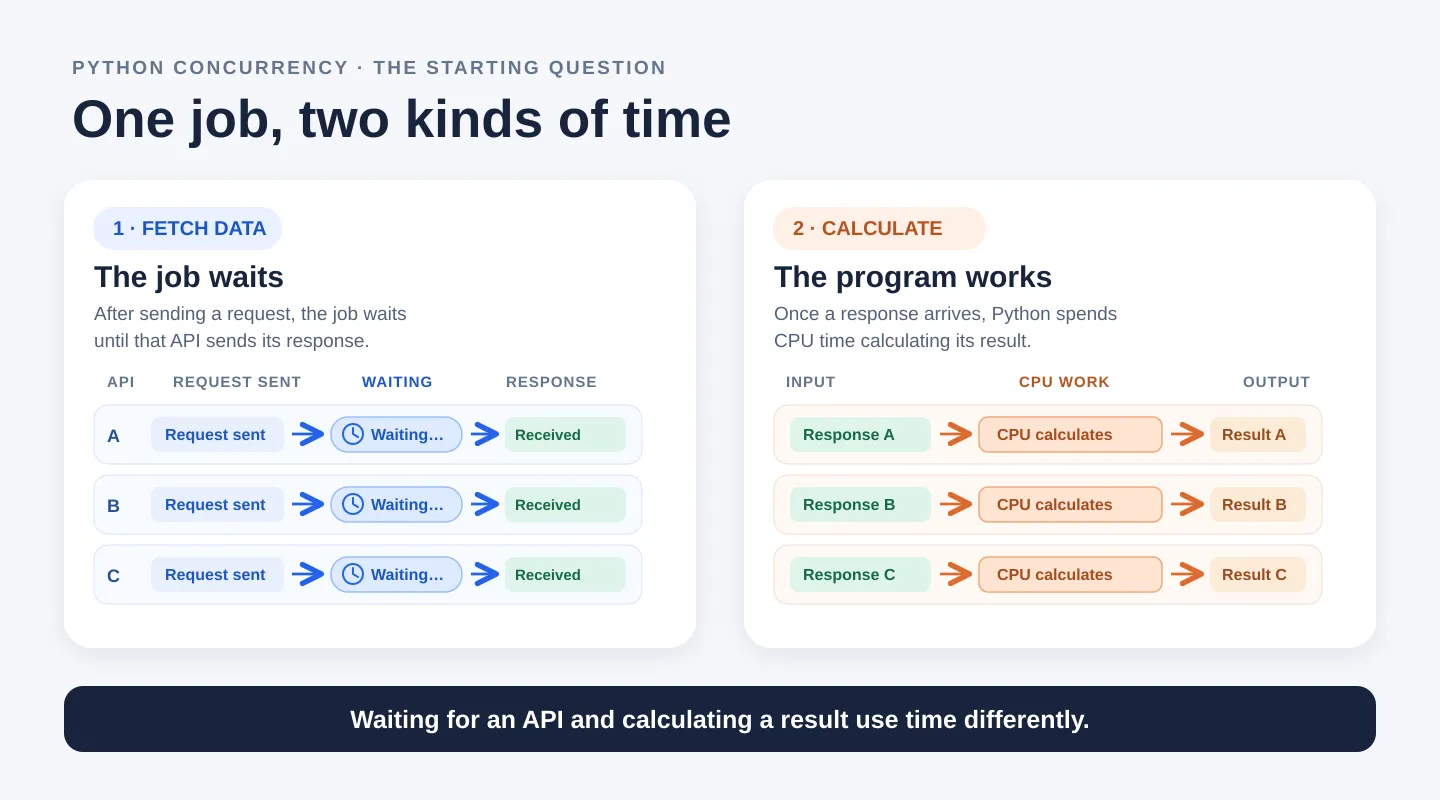
That difference, waiting versus calculating, is the starting point for choosing between threads, processes, and asyncio.
Concurrency and parallelism
Concurrency means making progress on several tasks over the same period. A program can start a second API request while the first one is still waiting for its response.
Parallelism means work happens at the same instant, such as two calculations running on different CPU cores.
Overlapping waits helps with API calls. Running calculations in parallel helps when the CPU is doing most of the work. These are different problems, and they need different tools.
Threads: useful for blocking I/O
A worker thread is a thread that runs the tasks handed to it. With ThreadPoolExecutor, we can give three URLs to three workers. This version uses one shared, blocking httpx.Client. The asyncio version later uses httpx.AsyncClient. Both make the same requests and return the response bytes:
from concurrent.futures import ThreadPoolExecutor
from itertools import repeat
import httpx

URLS = [
    "https://example.com",
    "https://www.python.org",
    "https://docs.python.org",
]


def fetch_blocking(client, url):
    response = client.get(url)
    response.raise_for_status()
    return response.content


with httpx.Client(timeout=10.0) as client:
    with ThreadPoolExecutor(max_workers=3) as pool:
        pages = list(pool.map(fetch_blocking, repeat(client), URLS))
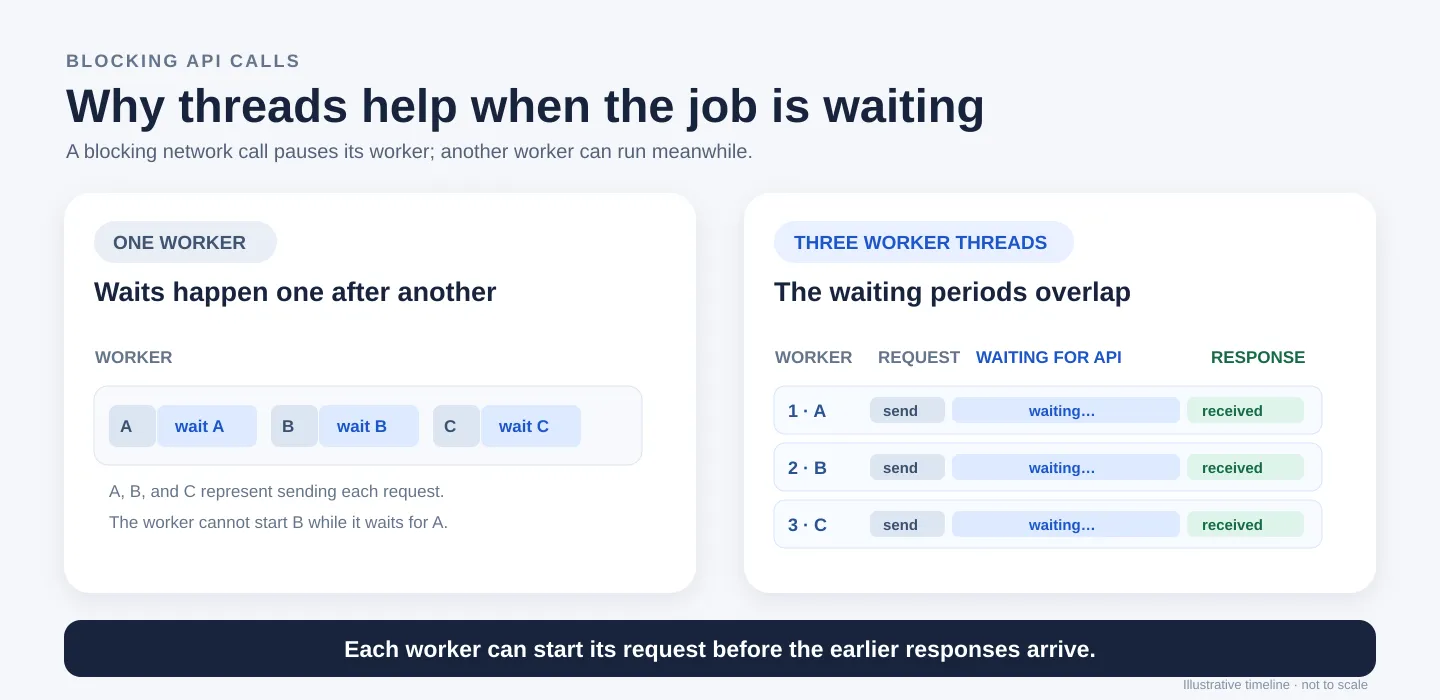
max_workers=3 allows up to three worker threads. repeat(client) passes the same HTTP client to every call, and pool.map() pairs it with each URL and returns the results in URL order. While the workers make the calls, the main program waits for their results. (HTTPX client documentation)
Threads help here because these calls are I/O-bound: most of their time is spent waiting for something outside Python, in this case the network. The measurements near the end show how much time this overlap saved in one local test. (Python threading documentation)
What does it mean for client.get() to block a worker?
Suppose worker A runs fetch_blocking() for the first URL:
- Worker A calls
client.get(url). It waits while a connection is made and the server sends its response. - Until
client.get()returns, worker A cannot run the next line offetch_blocking(). That is what blocked means here. - By default,
client.get()reads the whole response body before returning, so all of the network waiting happens inside that one call. fetch_blocking()then checks the status code and returns the page data as bytes.
Worker A’s wait does not stop worker B. Worker B can call client.get() for the second URL, and worker C for the third. (HTTPX quickstart)
Why don’t threads speed up every calculation?
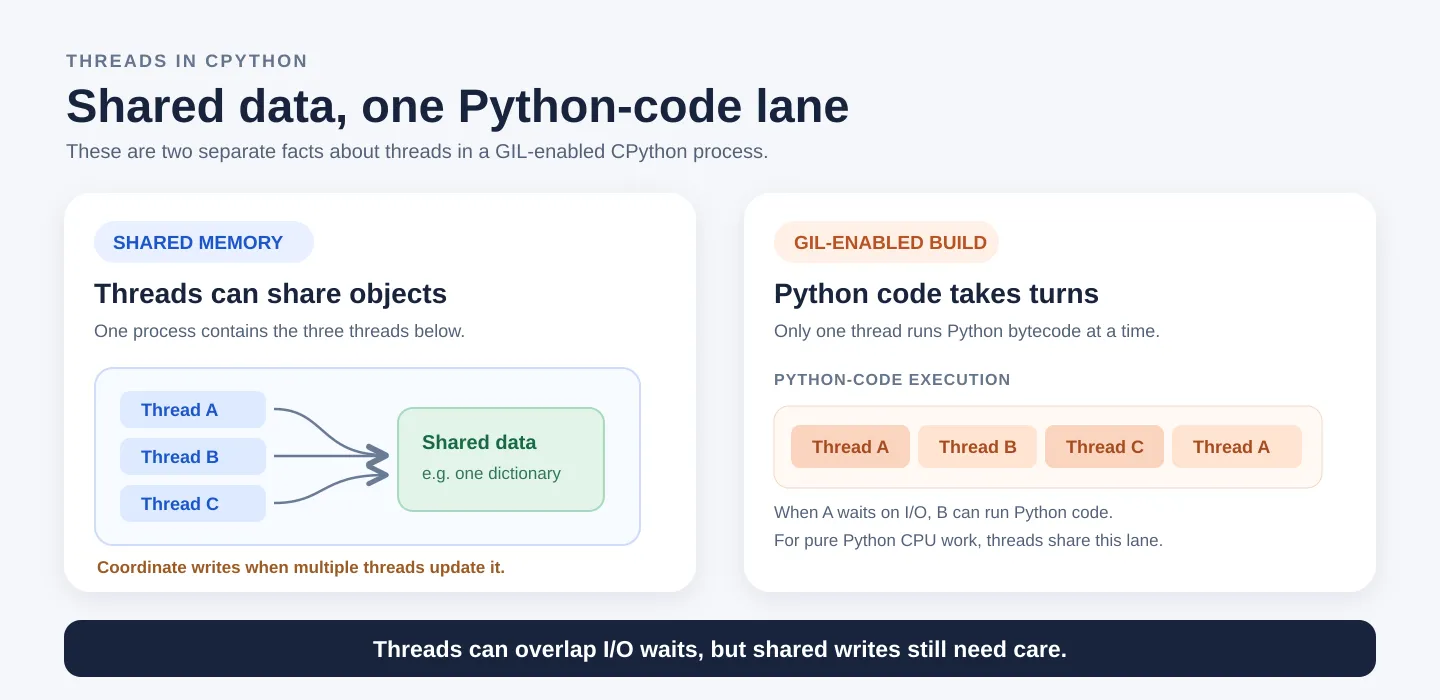
On a standard, GIL-enabled CPython build, the Global Interpreter Lock (GIL) allows only one thread at a time to run Python bytecode. Picture a single lane for running Python code: several threads may exist, but they take turns using that lane.
A worker that is waiting for an API response doesn’t need the lane, so another worker can use it. But if every worker is busy calculating in Python, they just keep taking turns. Adding threads generally won’t spread a pure Python calculation across several CPU cores. (Python threading documentation)
Threads in the same process can also access the same Python objects. That is convenient, but changing shared data needs care. In our example, each worker returns its own page data instead of writing to a shared results object. If workers do need to update a shared object, a lock or a queue can coordinate them.
Processes: useful for CPU-heavy Python work
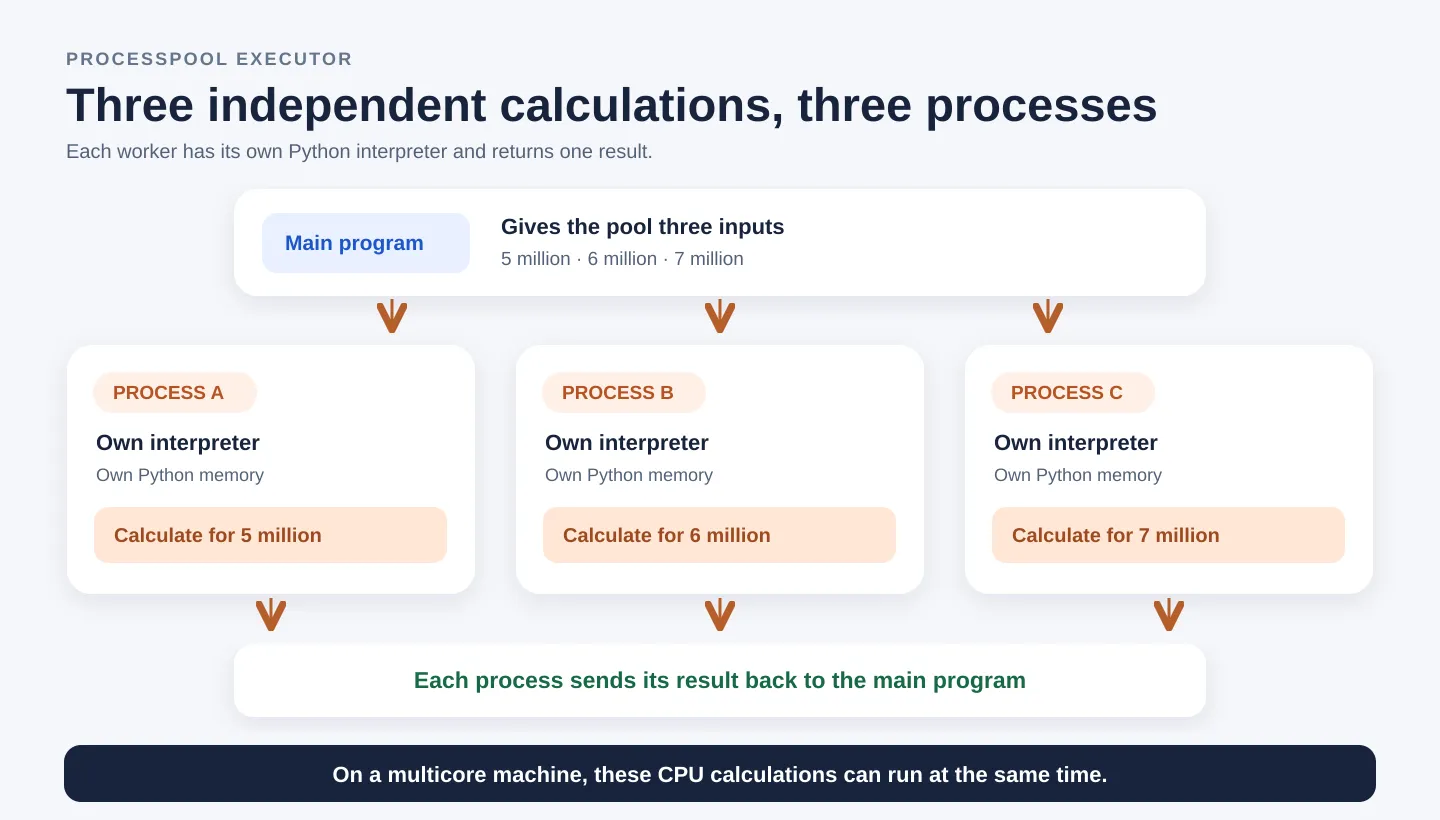
A process is a separate running instance of Python, with its own interpreter and its own memory. A process pool keeps a few worker processes ready and hands them tasks.
This helps with CPU-bound work: work that spends most of its time calculating rather than waiting for a network response. On a multicore machine, separate processes can run Python calculations at the same time, because they don’t have to take turns under one interpreter’s GIL. (Python multiprocessing documentation)
The next example uses a deliberately simple calculation so we can focus on the pool. sum_squares() adds up the squares of many numbers:
from concurrent.futures import ProcessPoolExecutor


def sum_squares(limit):
    total = 0
    for number in range(limit):
        total += number * number
    return total


if __name__ == "__main__":
    limits = [5_000_000, 6_000_000, 7_000_000]

    with ProcessPoolExecutor(max_workers=3) as pool:
        results = list(pool.map(sum_squares, limits))

    print(results)
There are three independent tasks: calculate for 5 million, 6 million, and 7 million. max_workers=3 allows up to three worker processes. Each worker runs the loop with its own total variable and sends its answer back, and pool.map() collects the answers.
Run this example as a script. The if __name__ == "__main__": guard stops the pool setup from running again when a worker process starts. (Python process pool documentation)
Before a worker can start a task, Python has to package the input, along with a reference to the function the worker should run. The worker also has to package its result to send it back. This packaging is called pickling. In our example, the inputs and results are plain numbers, and sum_squares() is defined at the top level of the module, where a worker can find it. A lambda, or a function defined inside another function, usually won’t work here.
Why not use processes for everything?
Processes do not automatically share ordinary Python objects. With ProcessPoolExecutor, inputs are normally packaged and sent to a worker, and results are sent back. Starting workers and moving data both cost time and memory.
In sum_squares(), each input and result is a single number, so very little data moves. Even so, if the calculation itself is tiny, process setup and communication can cost more than the work. Processes pay off when each independent task does substantial CPU work.
How does this relate to our API job?
First, the thread pool fetches responses A, B, and C. Those responses now live in the main process.
Now suppose analyzing each response takes several seconds of Python calculation. The main program could send one response to each worker process. Each worker receives its own copy of the data, calculates a result, and sends that result back. On a multicore machine, those calculations can run at the same time.
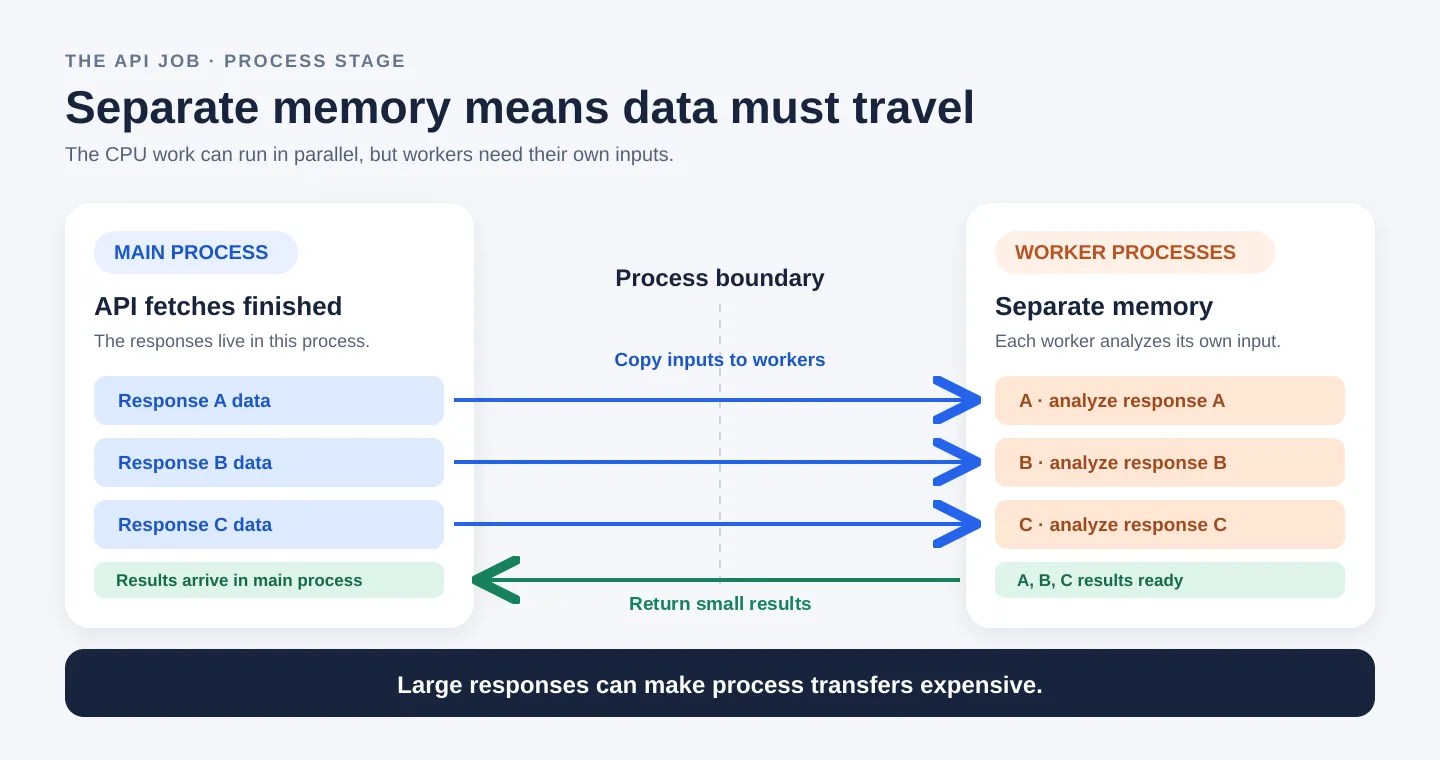
The trade-off is CPU time saved versus data-transfer cost. Sending large responses between processes can take significant time and memory. If the analysis is quick, that cost can outweigh the benefit. If the analysis is expensive, spreading it across processes may well be worth it.
asyncio: overlapping I/O waits with an event loop
Back to fetching data from three APIs. asyncio can overlap those waits without giving each request its own worker thread.
Three terms make this easier to follow:
- An event loop runs tasks that are ready and keeps track of tasks that are waiting for a result.
- A coroutine is the work created by calling an
async deffunction. It can pause and continue later. Calling the function only creates the coroutine; it doesn’t start the work. - A task is a coroutine scheduled on the event loop.
asyncio.gather()schedules the coroutines we give it as tasks. (A conceptual overview of asyncio)
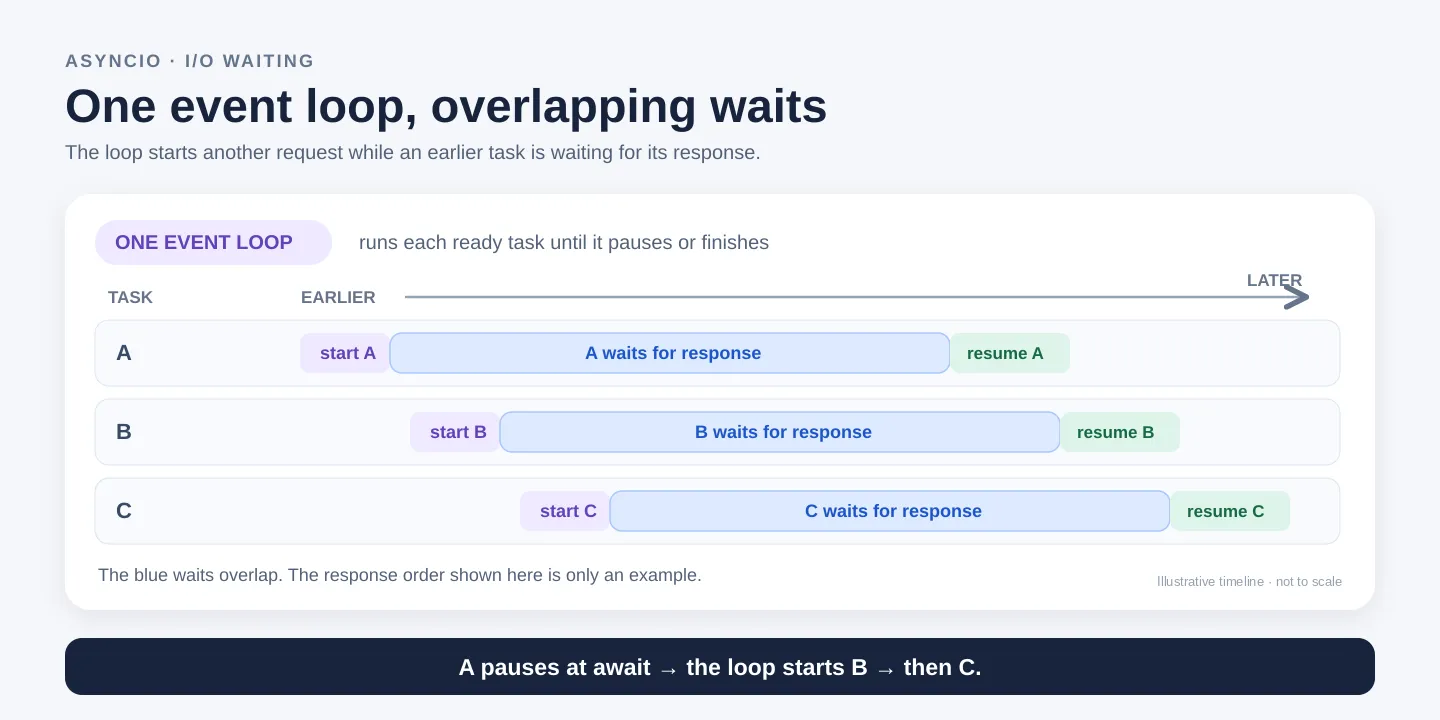
The loop starts request A. When A reaches an await and its response hasn’t arrived yet, A pauses, and the loop starts B, then C. As responses arrive, the loop resumes the matching tasks. The waits overlap, but the loop runs their Python code one task at a time. Responses can arrive in any order.
This example makes real HTTP requests with HTTPX’s async client, so it needs the httpx package. The sample URLs stand in for API endpoints:
import asyncio
import httpx

URLS = [
    "https://example.com",
    "https://www.python.org",
    "https://docs.python.org",
]


async def fetch_async(client, url):
    response = await client.get(url)
    response.raise_for_status()
    return response.content


async def main():
    async with httpx.AsyncClient(timeout=10.0) as client:
        pages = await asyncio.gather(
            *(fetch_async(client, url) for url in URLS)
        )
    print(f"Fetched {len(pages)} pages")


if __name__ == "__main__":
    asyncio.run(main())
Each call to fetch_async(client, url) creates a coroutine, and gather() schedules all three. Inside each task, await client.get(url) is the point where it can pause while its response is pending. Once all three finish, gather() returns their results in the same order as the URLs. (Python gather() documentation)
Why httpx.AsyncClient and not the regular client? Suppose request A is waiting for its response. At await client.get(url), A pauses, and the event loop is free to start B and C. If A called the blocking httpx.Client.get() instead, the event loop would be stuck inside A’s call until it finished, and B and C couldn’t start during that wait. Putting a blocking call inside async def does not make it asynchronous. A long calculation would tie up the event loop in exactly the same way. (Python asyncio development guide)
Putting the two stages together
Think of the API job as two steps. First, fetch A, B, and C so their network waits overlap. Then, once all three responses have arrived, give one response to each process for analysis. This example uses asyncio for the first step; threads with a blocking HTTP client would work just as well.
import asyncio
from concurrent.futures import ProcessPoolExecutor
import httpx

URLS = [
    "https://example.com",
    "https://www.python.org",
    "https://docs.python.org",
]


def analyze(data):
    return sum(byte * byte for byte in data)


async def fetch_async(client, url):
    response = await client.get(url)
    response.raise_for_status()
    return response.content


async def fetch_pages():
    async with httpx.AsyncClient(timeout=10.0) as client:
        return await asyncio.gather(
            *(fetch_async(client, url) for url in URLS)
        )


if __name__ == "__main__":
    pages = asyncio.run(fetch_pages())
    with ProcessPoolExecutor(max_workers=3) as pool:
        scores = list(pool.map(analyze, pages))
    print(scores)
asyncio.run(fetch_pages()) finishes the fetching step and gives us three response bodies in pages. Only then does pool.map(analyze, pages) send one body to each worker process and collect three scores. So the two steps happen in order: the requests overlap within the first step, and the calculations can run on separate CPU cores within the second. Because the response bytes have to travel from the main process to the workers, large responses make this handoff more expensive. (Python process pool documentation)
analyze() is deliberately tiny so the handoff is easy to see. With so little calculation, the process overhead probably costs more than it saves; in a real job, the analysis would need to be substantial before a process pool was worth it. The benchmark below measures the fetching and calculating approaches separately; it doesn’t time this combined example.
This example also keeps the two steps strictly in order. A possible optimization is to start analyzing each response as soon as it arrives instead of waiting for all three, but that needs concurrency limits and error handling, which are beyond this article.
What I measured
I timed the article’s I/O and CPU functions with time.perf_counter(). The I/O test fetched three URLs from a small test server on the same machine, which waited one second before each response. The CPU test ran sum_squares() for 5 million, 6 million, and 7 million. Before timing anything, I checked that every approach returned identical results. Each timed run includes creating the client or pool. The values are medians of three runs on my local machine: GIL-enabled CPython 3.14.8 with 12 logical CPUs.
The sequential baselines are plain loops. For the CPU comparison, the thread and process versions differ only in the executor class:
# Sequential baselines: the same inputs and functions
with httpx.Client(timeout=10.0) as client:
    pages = [fetch_blocking(client, url) for url in URLS]
results = [sum_squares(limit) for limit in limits]

# CPU comparison: only the executor class changes
with ThreadPoolExecutor(max_workers=3) as pool:
    threaded_results = list(pool.map(sum_squares, limits))

with ProcessPoolExecutor(max_workers=3) as pool:
    process_results = list(pool.map(sum_squares, limits))
Results (median wall-clock time):
| Workload | Sequential | Threads | asyncio | Processes |
|---|---|---|---|---|
| 3 HTTP calls (1 s wait each) | 3.019 s | 1.020 s | 1.021 s | — |
sum_squares for 5M, 6M, 7M | 1.254 s | 1.221 s | — | 0.509 s |
Processes were 2.46× faster than running sequentially (1.254 s → 0.509 s). Why not 3× with three workers? The tasks are not equal: the 7 million calculation is the largest, so it determines when the pool can finish. If the work scaled perfectly with the loop sizes, it would account for about 7/18 of the sequential total, or roughly 0.49 s. The observed 0.509 s is close to that estimate; process startup, scheduling, and result transfer also add overhead.
These numbers show what overlapping waits and parallel calculation can do. They don’t show that asyncio is faster than threads in general. A local server with a fixed delay also leaves out what real APIs add: DNS lookups, TLS handshakes, variable network latency, failures, and rate limits or quotas. So this test is repeatable, but it doesn’t predict timings for real APIs or other machines.
You can reproduce it with threads_processes_asyncio_benchmark.py, which contains the article’s functions unchanged and starts its own local test server. For your own job, time the fetching and calculating stages separately, and repeat each measurement. (Python perf_counter() documentation)
What I learned
Threads and processes were fairly easy to understand at a basic level: threads let waits overlap, and processes let pure Python calculations run on separate CPU cores. asyncio was the hard part. At first, I couldn’t see what it actually was. What made it click was realizing that it solves the same problem as threads, overlapping waits, but in a different way: threads use several workers, while asyncio uses one worker that never sits waiting. It simply moves on to another task at each await. My benchmark showed this too: threads and asyncio both brought three 1-second requests down to about 1 second. So the real question isn’t which one is faster, but which one fits the project. If the code uses normal blocking libraries, I’d use threads; if it’s already built on async libraries, asyncio.
Which should you choose?
Picture a restaurant. Taking orders and cooking meals are different kinds of work:
| Tool | Everyday example | What it illustrates |
|---|---|---|
| Threads | Three waiters serve separate tables. Waiter A waits for a guest to decide while B and C carry on. | One worker waits while the others continue. |
| asyncio | One waiter takes table A’s order, serves B and C while A decides, then checks back on A. | One worker moves between waiting tasks. |
| Processes | Three cooks prepare dishes in separate kitchens. Ingredients and finished dishes have to travel. | Independent work happens at once, but transfers cost time. |
Back in Python: threads and asyncio help overlap I/O waits; processes help with substantial CPU calculations.
Start by finding where your program spends its time: waiting for data or calculating from it. Then choose the tool for that part of the job.
Going further
A few related topics I haven’t covered here:
- Free-threaded Python: Python 3.14 officially supports an optional build without the GIL, where threads can run Python code on several cores at once. (Python free-threading guide)
- Native extensions: some libraries release the GIL while doing heavy work in native code, so threads can help with those specific operations. (Python C API: thread states and the GIL)
asyncio.to_thread(): runs an existing blocking function in a worker thread from async code. (Pythonto_thread()documentation)- Limiting concurrency:
asyncio.Semaphorecaps how many requests run at once, andasyncio.TaskGroup(Python 3.11+) is another way to manage a group of tasks. (Semaphoredocumentation,TaskGroupdocumentation)
I’m Meet, a backend engineer working with Python and Django. I write about backend, API, and system-design decisions. If you spot a mistake or want to talk backend engineering, reach out on LinkedIn.
- #python
- #concurrency
- #asyncio
- #multiprocessing